Six months of broken iOS builds, fixed by one environment variable
Our app compiled in Xcode but failed via xcodebuild. For half a year nobody could figure out why. The fix was a single line in the Podfile.
For six months, our iOS builds were haunted. The app compiled perfectly in Xcode. Open the project, hit build, everything green. But run xcodebuild from the command line, the same way CI does it, and the compiler would throw a wall of errors about missing protocol declarations, undeclared identifiers, and absent TurboModule types.
We tried everything. Clean builds. Derived data wipes. Pod cache resets. Nix shell rebuilds. Different macOS versions. Nothing worked. The bug became background noise, something we worked around by building certain things through Xcode directly instead of the CLI. Nobody could figure out why the same project, the same source, the same machine, would compile one way and not the other.
After six months of tolerating this, I opened issue #15911, sat down, and decided to solve it properly. It took two days.
The symptoms#
After upgrading React Native from 0.67.5 to 0.69.10, xcodebuild would fail with errors in RCTNativeAnimatedTurboModule.mm:
Cannot find protocol declaration for 'NativeAnimatedModuleSpec'Use of undeclared identifier 'JS::NativeAnimatedModule'No member named 'TurboModule' in namespace 'facebook::react'
These are all types generated by React Native's codegen system. The files that should contain them existed on disk, but they were empty. Zero bytes. The codegen had created the files but never populated them.
And yet, after building once in Xcode.app, the files were full and everything compiled. Something about Xcode's build process was triggering the codegen that xcodebuild was not.
The debugging approach#
I stopped guessing and started measuring.
Step 1: prove that Xcode changes something.
I computed MD5 checksums of every file in node_modules/ before and after a successful Xcode.app build. The checksums changed. Xcode was mutating node_modules during the build. This confirmed the suspicion: Xcode was doing something that xcodebuild was not.
Step 2: find exactly what changed.
Per-file checksum diff of node_modules/ showed only react-native-config/ios/ReactNativeConfig/GeneratedDotEnv.m changed. A red herring, that file is auto-generated on every build regardless.
Step 3: look outside node_modules/.
I expanded the checksum scan to ios/build/. Found two files that were empty before the Xcode build and populated after:
ios/build/generated/ios/FBReactNativeSpec/FBReactNativeSpec-generated.mm
ios/build/generated/ios/FBReactNativeSpec/FBReactNativeSpec.h
The header contained exactly the protocol declarations the compiler was complaining about:
@protocol NativeAnimatedModuleSpec <RCTBridgeModule, RCTTurboModule>Now I knew what was missing. The question was why.
Step 4: trace the codegen pipeline.
I followed the chain: Podfile calls use_react_native! in react_native_pods.rb, which calls generate-artifacts.js, which calls generate-specs-cli.js. The code to generate and copy artifacts to the output directory existed and looked correct. But it wasn't running during pod install.
Step 5: find the gate.
Deep in generate-artifacts.js, there was a check for an environment variable: USE_CODEGEN_DISCOVERY. If it wasn't set to "1", the codegen step was skipped entirely. Xcode.app set this variable through its own build environment. xcodebuild and pod install from the CLI did not.
The fix#
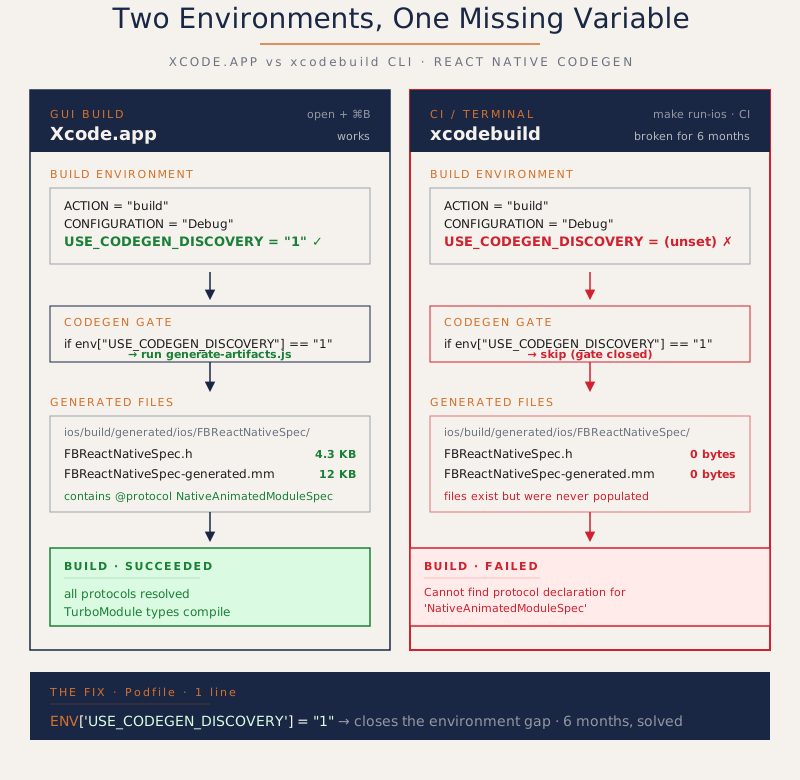
One line in the Podfile:
ENV['USE_CODEGEN_DISCOVERY'] = "1"Six months of broken CI builds. One environment variable.
It came back#
The same class of bug resurfaced when we upgraded to React Native 0.73 (issue #18548). Same symptoms: make run-ios failed, Xcode.app worked, again in the FBReactNativeSpec generation phase.
This time the cause was different. React Native 0.73 changed how codegen was triggered, moving from environment variables to script phases. The failing script referenced a path (/../../scripts/xcode/with-environment.sh) that didn't exist in our Nix-based build environment. And buried in script_phases.sh, a cp -R -X command used the -X flag (exclude extended attributes) which behaved differently under Nix.
The fix was patching out the -X flag. An external developer from Galoy later used the same fix for their project after finding our issue.
The pattern#
React Native's iOS codegen is fragile. It depends on environment variables, script phases, and path conventions that differ between Xcode.app's build environment and the CLI. Every major React Native version has changed how codegen is triggered, and every change has broken the CLI path in a different way.
The lesson from six months of ignoring this: when a bug only reproduces in one environment but not another, the fix is almost always an environment difference, not a code difference. Checksumming everything before and after the working build was the technique that cracked it. Instead of asking "what's wrong with our code," I asked "what is Xcode doing that we're not." Two days.
The other lesson: open the issue. Write down what you know, what you've tried, and what you haven't. The act of documenting the problem systematically is often what leads to solving it. For six months this bug lived in Discord threads and verbal complaints. The moment I put it in an issue with a clear reproduction path, I found the answer.
Support · Optional and appreciated
If something I've built or written saved you time, you can keep the lights on.